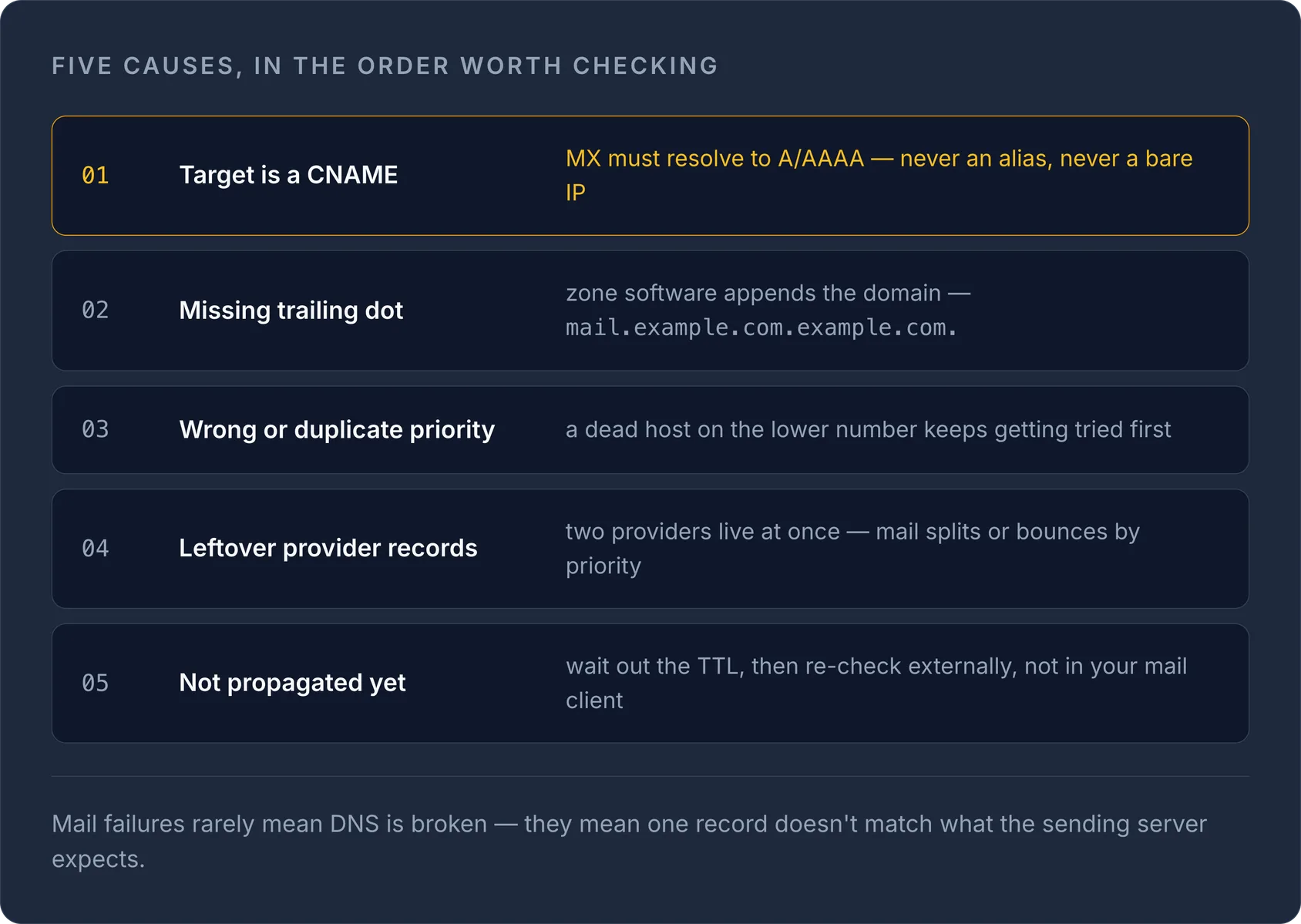
Als een MX-record niet werkt, ligt de oorzaak bijna altijd bij een van deze vijf dingen: een CNAME als doel in plaats van een A/AAAA-hostnaam, een typfout of ontbrekende afsluitende punt in het doel, verkeerde of dubbele prioriteitswaarden, achtergebleven records van een oude mailprovider, of DNS die simpelweg nog niet is gepropageerd. Problemen met maildelivery betekenen zelden dat DNS "kapot" is. Meestal komt één specifiek record niet overeen met wat de verzendende mailserver verwacht. Deze handleiding loopt elke oorzaak door en laat zien hoe je die bevestigt.
Wat een MX-record eigenlijk doet
Een MX-record (Mail Exchange) vertelt verzendende mailservers welke host e-mail voor je domein accepteert. Elk MX-record bestaat uit twee delen, gedefinieerd in RFC 1035: een preference (vaak prioriteit genoemd) en een exchange (de hostnaam van de mailserver). Lagere preference-waarden worden eerst geprobeerd: een MX met preference 10 wordt gebruikt vóór een MX met preference 20.
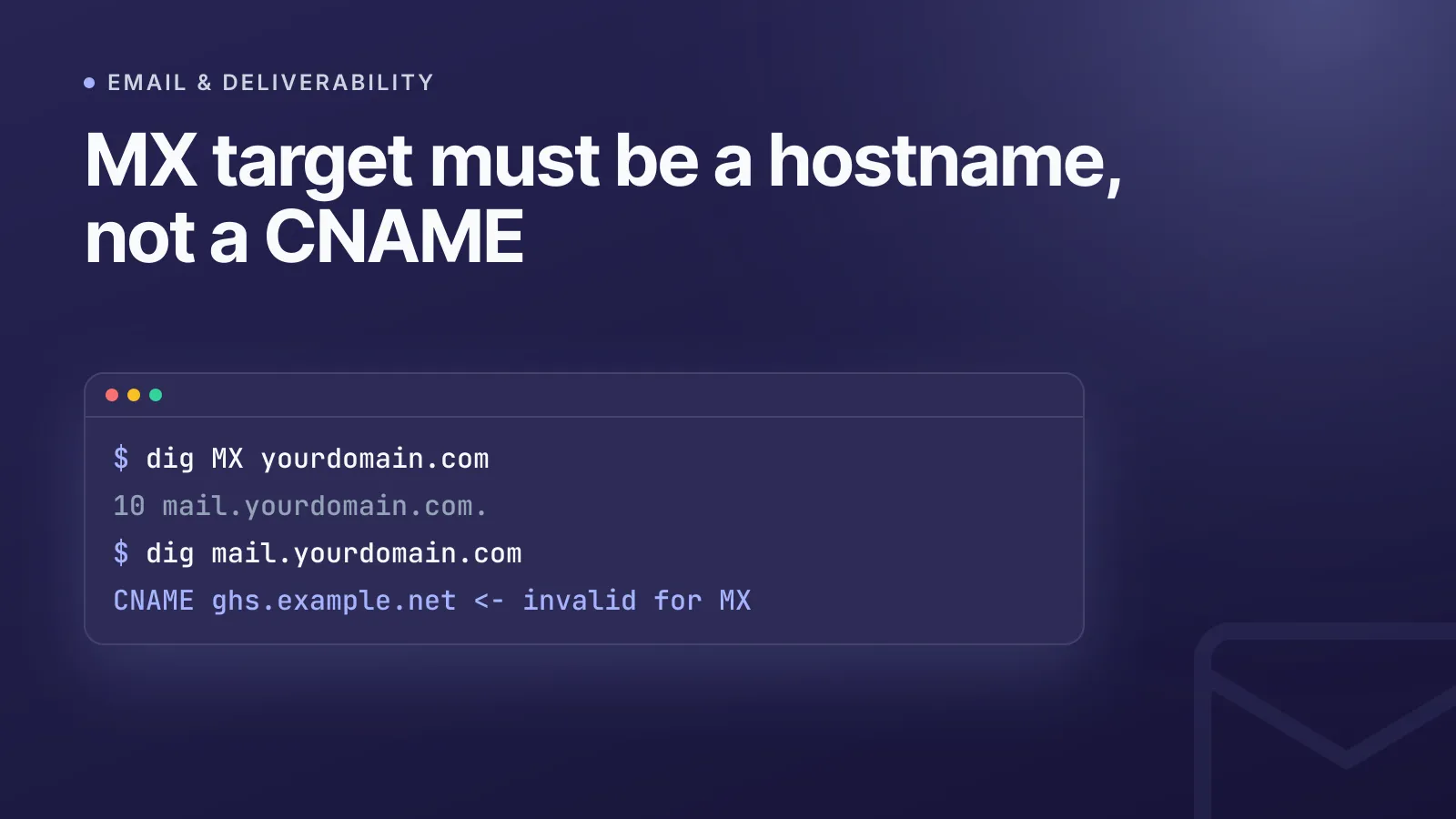
Een cruciale regel uit RFC 5321 (de SMTP-standaard) en RFC 2181: het doel van een MX-record moet verwijzen naar een A- of AAAA-record, nooit naar een CNAME en nooit naar een kaal IP-adres. Laat je een MX naar een alias wijzen, dan weigeren sommige ontvangende en verzendende servers dat direct of gedragen ze zich onvoorspelbaar. Deze ene misconfiguratie zit achter een groot deel van de tickets over "mail werkt niet".
Stap 1: vraag het live record op, niet je configuratiescherm
Het dashboard van je registrar kan achterlopen op wat er daadwerkelijk op internet is gepubliceerd. Vraag DNS rechtstreeks op:
dig MX yourdomain.com
of
nslookup -type=MX yourdomain.com
Beide omzeilen je lokale cache en vragen een resolver direct, zodat je ziet wat mailservers wereldwijd werkelijk zien. Je kunt ook zonder terminal snel controleren met onze gratis MX-lookuptool. Dat is de snelste manier om te bevestigen wat er nu gepubliceerd is voordat je iets gaat wijzigen.
TipControleer MX altijd met een externe tool of vanaf een ander netwerk. Een record kan er vanaf je kantoorwifi (die het oude antwoord in de cache heeft) correct uitzien terwijl de rest van het internet het nieuwe al ziet, of andersom.
Oorzaak 1: MX verwijst naar een CNAME
Als dig MX een doel teruggeeft dat zelf een CNAME-record heeft, bijvoorbeeld mail.yourdomain.com als CNAME naar ghs.example.net, dan is dat ongeldig volgens RFC 1035/5321. Los het op door het MX-record rechtstreeks te laten verwijzen naar een hostnaam met een eigen A/AAAA-record, of door de canonieke hostnaam van de mailprovider te gebruiken (die zij aan hun kant al correct hebben ingericht).
Oorzaak 2: afsluitende punt of typfouten in de hostnaam
In een ruw zonebestand moet een volledig gekwalificeerde domeinnaam eindigen op een punt (mail.yourdomain.com.). Vergeet je die, dan plakt sommige DNS-software je domein er stilletjes achter, met iets kapots als mail.yourdomain.com.yourdomain.com. als resultaat. De meeste moderne registrar-dashboards voegen de afsluitende punt automatisch toe, maar als je zonebestanden rechtstreeks bewerkt (of ons DNS-beheer met handmatige invoer gebruikt), is het verstandig de exacte waarde die je provider vereist dubbel te controleren.
Controleer ook:
- Het Host/Naam-veld staat op
@(of is leeg) voor mail op het hoofddomein, niet opmailof de volledige domeinnaam herhaald. - De doelhostnaam bevat geen losse spaties en komt exact overeen met wat je mailprovider heeft opgegeven.
Oorzaak 3: verkeerde of dubbele prioriteiten
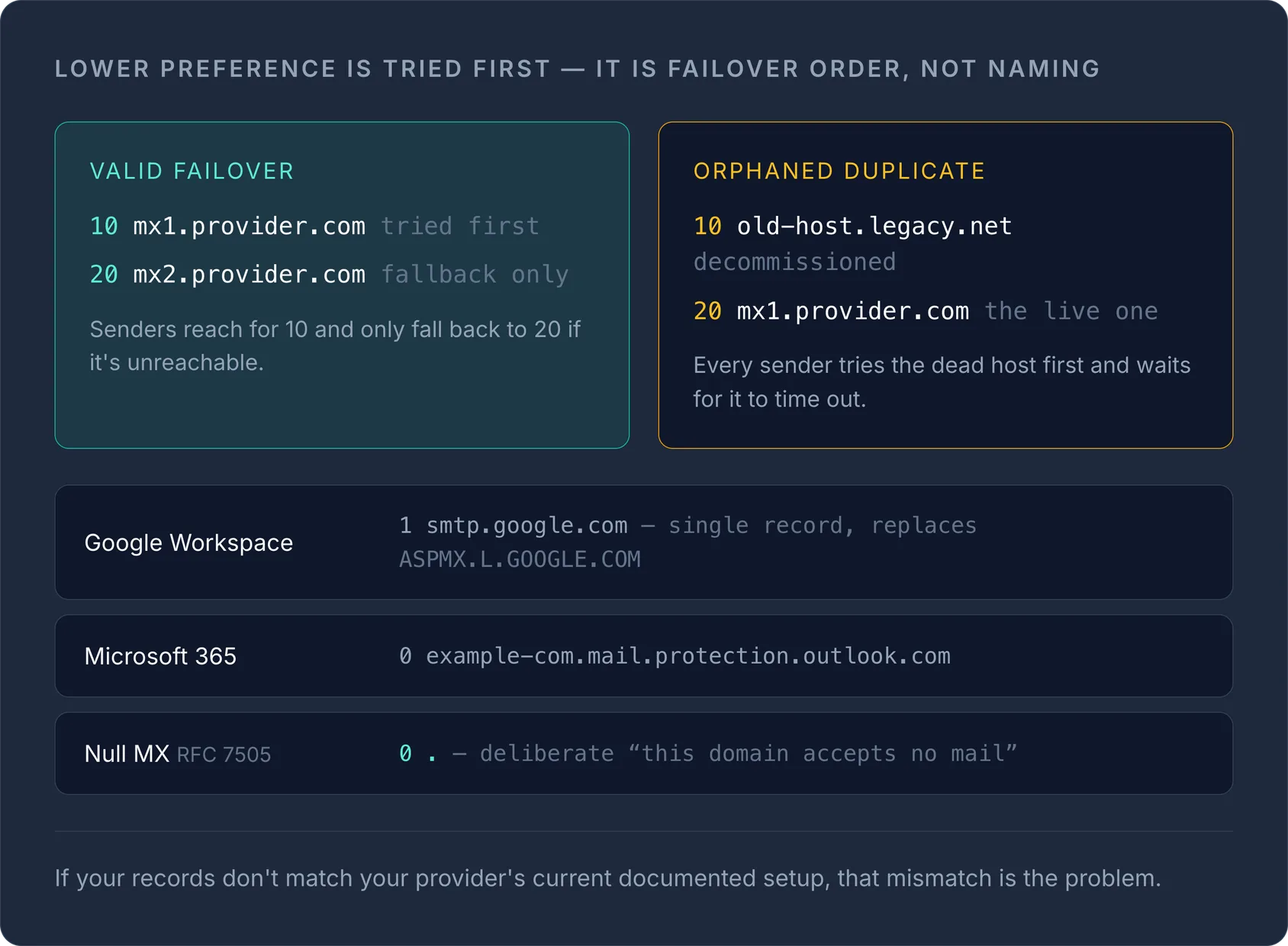
Prioriteitswaarden (preference) bepalen de failover-volgorde, niet welk record op naam "primair" is. Een opzet als deze is geldig en gebruikelijk:
| Prioriteit | Mailserver |
|---|---|
| 10 | mx1.provider.com |
| 20 | mx2.provider.com |
Verzendende servers proberen eerst prioriteit 10 en vallen alleen terug op 20 als die onbereikbaar is. Problemen ontstaan wanneer:
- Twee records dezelfde prioriteit hebben terwijl dat niet de bedoeling is: mail wordt dan willekeurig over beide verdeeld in plaats van op volgorde te failoveren.
- Een uit gebruik genomen server een lager getal (hogere prioriteit) houdt dan de actieve server, waardoor verzenders steeds eerst de dode host proberen.
Google Workspace raadt nu één MX-record aan, smtp.google.com met prioriteit 1, ter vervanging van de oudere opzet met meerdere ASPMX.L.GOOGLE.COM-records. Microsoft 365 genereert bij het verifiëren van het domein automatisch één record, meestal yourdomain-com.mail.protection.outlook.com met prioriteit 0. Komen je records niet overeen met de actuele, gedocumenteerde opzet van je provider, dan is dat verschil je probleem.
Oorzaak 4: achtergebleven records van een vorige provider
Een heel gebruikelijke migratiefout: je stapt over van je oude host naar Google Workspace of Microsoft 365, voegt de nieuwe MX-records toe, maar verwijdert de oude nooit. Nu staan de MX-records van twee providers tegelijk live en wordt mail verdeeld of teruggestuurd, afhankelijk van welke prioriteit wint. Bekijk altijd alle MX-records van het domein en verwijder alles wat niet bij je huidige provider hoort.
Oorzaak 5: vertraging door DNS-propagatie
Als het record klopt maar mail zich nog steeds vreemd gedraagt, controleer dan de TTL (time to live) van het record. Sommige resolvers cachen antwoorden tot hun TTL verloopt, zelfs nadat je een correctie hebt gepubliceerd, en bepaalde cachelagen houden ze langer vast, ongeacht een lagere TTL die je hebt ingesteld. Wacht de TTL-periode af voordat je concludeert dat de correctie niet werkt, en controleer opnieuw met een externe lookuptool in plaats van je eigen browser of mailclient, die mogelijk een verouderde lokale cache gebruikt.
Helemaal geen MX-record: is dat geldig?
Ja, in één specifiek geval. RFC 7505 definieert de Null MX: één record met preference 0 en doel . (een losse punt), dat verzenders expliciet vertelt "dit domein accepteert geen mail, probeer het niet opnieuw". Dit is bedoeld voor domeinen die alleen voor websites worden gebruikt en niet voor e-mail. Het is geen misconfiguratie als je het bewust instelt.
Als er echt geen MX-record en geen Null MX is, zegt RFC 5321 dat verzenders moeten terugvallen op het A/AAAA-record van het domein als impliciete mailhost. Op die fallback vertrouwen is echter kwetsbaar en wordt door nieuwere mailsystemen steeds minder ondersteund. Reken er niet op; voeg in plaats daarvan een expliciete MX of een Null MX toe.
MX ziet er goed uit, maar mail komt toch niet aan
Als dig MX precies teruggeeft wat je verwacht en de prioriteiten kloppen, ligt de fout meestal verderop dan de routering en niet bij het MX-record zelf:
- Een ontbrekend of onjuist SPF-record, waardoor ontvangende servers mail weigeren of als spam markeren. Zie onze handleiding over een veilig SPF-record aanmaken.
- Ontbrekende DKIM-ondertekening.
- Een firewall op de mailserver die poort 25 of 587 blokkeert.
Dit zijn deliverability-problemen, geen MX-problemen, maar voor eindgebruikers zien ze er precies hetzelfde uit ("e-mail werkt niet"). Het is de moeite waard ze uit te sluiten zodra het MX-record zelf in orde is. Voor het volledige beeld van hoe MX zich verhoudt tot A, TXT, CAA en andere recordtypes, zie onze handleiding over DNS-recordtypes.
Wat de bounce-meldingen betekenen
Mailservers melden MX-problemen in hun eigen woorden, en juist die exacte tekst is meestal waar mensen op zoeken. De twee meest voorkomende:
"No MX record found for domain=example.com; reason=empty DNS record": de verzendende server vroeg DNS om de MX-records van het ontvangende domein en kreeg een geldig antwoord zonder inhoud. DNS werkte; het domein publiceert gewoon geen mailroute. Typische oorzaken:
- Het adres bevat een typfout, of het domein ontvangt helemaal geen mail.
- De MX-records zijn verloren gegaan bij een DNS-verhuizing: ze bestaan nog bij de oude provider, maar de nameservers wijzen nu naar een nieuwe provider waar niemand ze opnieuw heeft aangemaakt.
- Het adres staat op een subdomein (
user@mail.example.com). MX-records worden niet overgeërfd, dus het subdomein heeft een eigen MX nodig, ook als het bovenliggende domein er een heeft. - Het domein publiceert bewust een Null MX (zie hierboven), wat sommige servers op dezelfde manier melden.
Controleer met dig MX example.com +short en dig NS example.com +short. Een leeg MX-antwoord van de nameservers waarnaar het domein daadwerkelijk delegeert, bevestigt het; voeg de MX daar toe, niet bij de provider die je het laatst hebt bewerkt.
"Temporary error looking up MX record … timed out": hier mislukte de lookup zelf en kwam er helemaal geen antwoord terug. Dat wijst op de nameservers van het domein, niet op de records: ze liggen eruit, zijn onbereikbaar of de delegatie noemt servers die de zone niet meer bedienen. Een kapotte DNSSEC-keten heeft hetzelfde effect: validerende resolvers geven SERVFAIL terug. Verzenders beschouwen dit als tijdelijk en proberen het een paar dagen opnieuw, dus mail wordt vertraagd in plaats van verloren, totdat de pogingen op zijn. Vraag elke nameserver rechtstreeks op (dig @ns1.example.net MX example.com) om te vinden welke niet antwoordt.
Snelle checklist voor diagnose
- Voer
dig MX yourdomain.comuit of gebruik de MX-lookuptool om te bevestigen wat er werkelijk gepubliceerd is. - Controleer dat de doelhostnaam geen CNAME is en naar een A/AAAA-record verwijst.
- Controleer op problemen met de afsluitende punt als je ruwe zonebestanden bewerkt.
- Verifieer dat de prioriteitswaarden overeenkomen met de actuele, gedocumenteerde opzet van je provider, zonder verweesde duplicaten.
- Verwijder oude MX-records van eventuele vorige mailproviders.
- Wacht na een wijziging de TTL-periode af voordat je opnieuw test.
Als je DNS beheert voor meerdere domeinen bij verschillende registrars, wordt het lastiger om MX, SPF en andere mailrecords consistent te houden naarmate de lijst groeit. Met ons DNS-beheer controleer en bewerk je records bij elke provider op één plek, in plaats van ze los na te jagen.
Veelgestelde vragen
#Kan een MX-record naar een IP-adres verwijzen in plaats van naar een hostnaam?
Nee. MX-records moeten verwijzen naar een hostnaam die zelf een A- of AAAA-record heeft; rechtstreeks naar een IP-adres verwijzen is ongeldig volgens RFC 1035 en wordt door mailservers die de standaard volgen geweigerd of genegeerd.
#Waarom werkt mijn MX-record op de ene locatie wel en op de andere niet?
DNS-antwoorden worden door resolvers over de hele wereld gecachet, dus een recent gewijzigd record kan er vanaf het ene netwerk correct uitzien terwijl een andere resolver nog het oude, gecachete antwoord geeft totdat de TTL verloopt.
#Is het oké om helemaal geen MX-record te hebben?
Alleen als je dat bewust instelt met een Null MX-record (RFC 7505), één MX met preference 0 en doel ".", dat verzenders vertelt dat het domein geen mail accepteert; per ongeluk geen MX hebben kan leiden tot onvoorspelbaar fallback-gedrag.
#Wat is het verschil tussen MX-prioriteit en preference?
Het is dezelfde waarde onder verschillende namen: RFC 1035 noemt het preference, de meeste configuratieschermen noemen het prioriteit, en in beide gevallen betekent een lager getal dat de mailserver eerst wordt geprobeerd.
Probeer het met een gratis tool
Was dit artikel nuttig?