DNS propagation is the time it takes for a DNS change to become visible everywhere, and it's driven entirely by TTL (Time To Live) caching, not by any global broadcast or sync process. There's no single moment when a change "goes live" worldwide — different resolvers will pick it up at different times based on what they already have cached and for how long.
Understanding this makes DNS changes far less mysterious. Once you know what actually controls the delay, you can plan changes so they roll out predictably instead of guessing and refreshing your browser.
What does "DNS propagation" actually mean?
The term isn't part of any formal DNS specification — it's shorthand the industry uses for the lag between updating a record at your authoritative nameserver and every resolver worldwide reflecting that update. Each resolver that queries your domain caches the answer, and it will keep serving that cached answer until its self-imposed expiry runs out.
So "propagation" isn't something happening to your record. It's the natural side effect of thousands of independent caches around the world each deciding, on their own schedule, when to ask again.
The real driver: TTL
Every DNS record carries a TTL value, in seconds, set by whoever manages the zone. TTL tells any resolver that caches the record: "you may reuse this answer for this many seconds before you're required to check with the authoritative server again." This behaviour is defined in RFC 1035, and RFC 2181 later clarified that every record in the same record set must share one TTL, and that resolvers should always honour the lowest TTL they've seen for that set.
A few common TTL values, and what they mean in practice:
| TTL (seconds) | Roughly | Typical use |
|---|---|---|
| 300 | 5 minutes | Before a planned migration, or for records you expect to change often |
| 3600 | 1 hour | A reasonable default for most production records |
| 86400 | 24 hours | Stable records you rarely touch (some MX, NS entries) |
Lower TTLs mean faster propagation but more queries hitting your authoritative DNS. Higher TTLs mean fewer queries and better caching performance, but slower rollout if you need to change something urgently. If you're not sure what's currently set on a record, our DNS lookup tool will show you the live TTL alongside the value.
The TTL gotcha almost everyone hits once
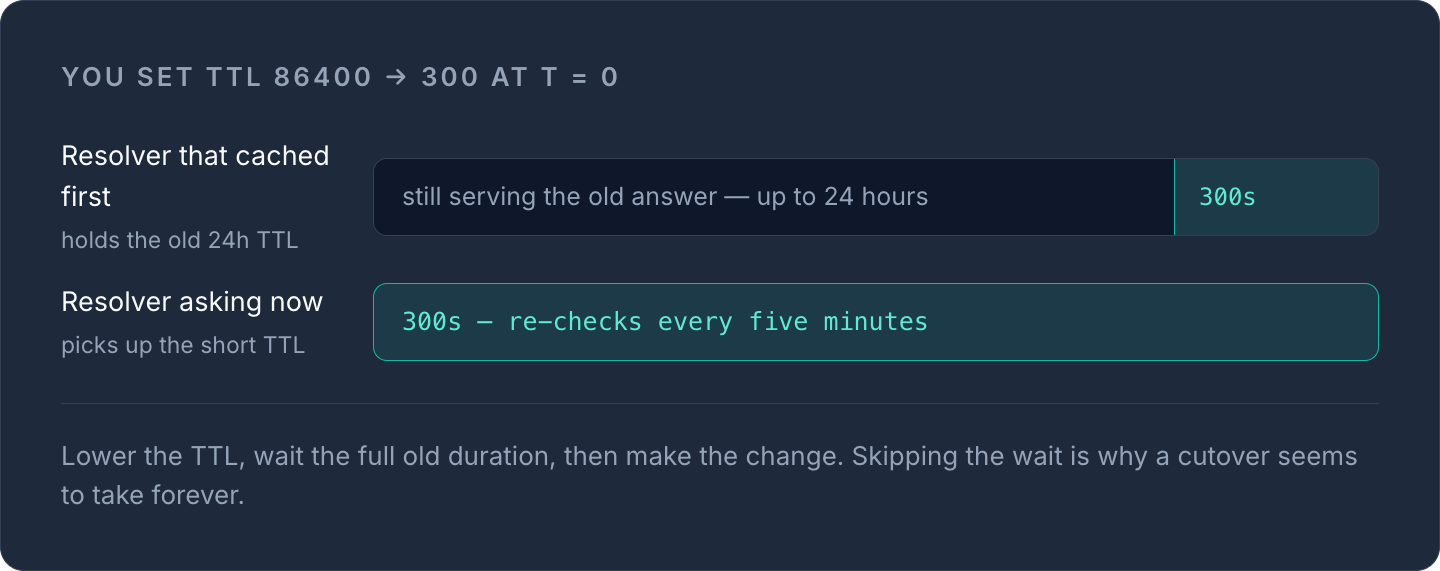
Here's the part that catches people out: lowering a TTL only takes effect after the previous, longer TTL has expired. If your A record currently has a 24-hour TTL and you change it to 300 seconds, resolvers that already cached the record under the old TTL will keep using that cached copy — and the old TTL value — for up to 24 hours before they check again and notice the new, shorter TTL.
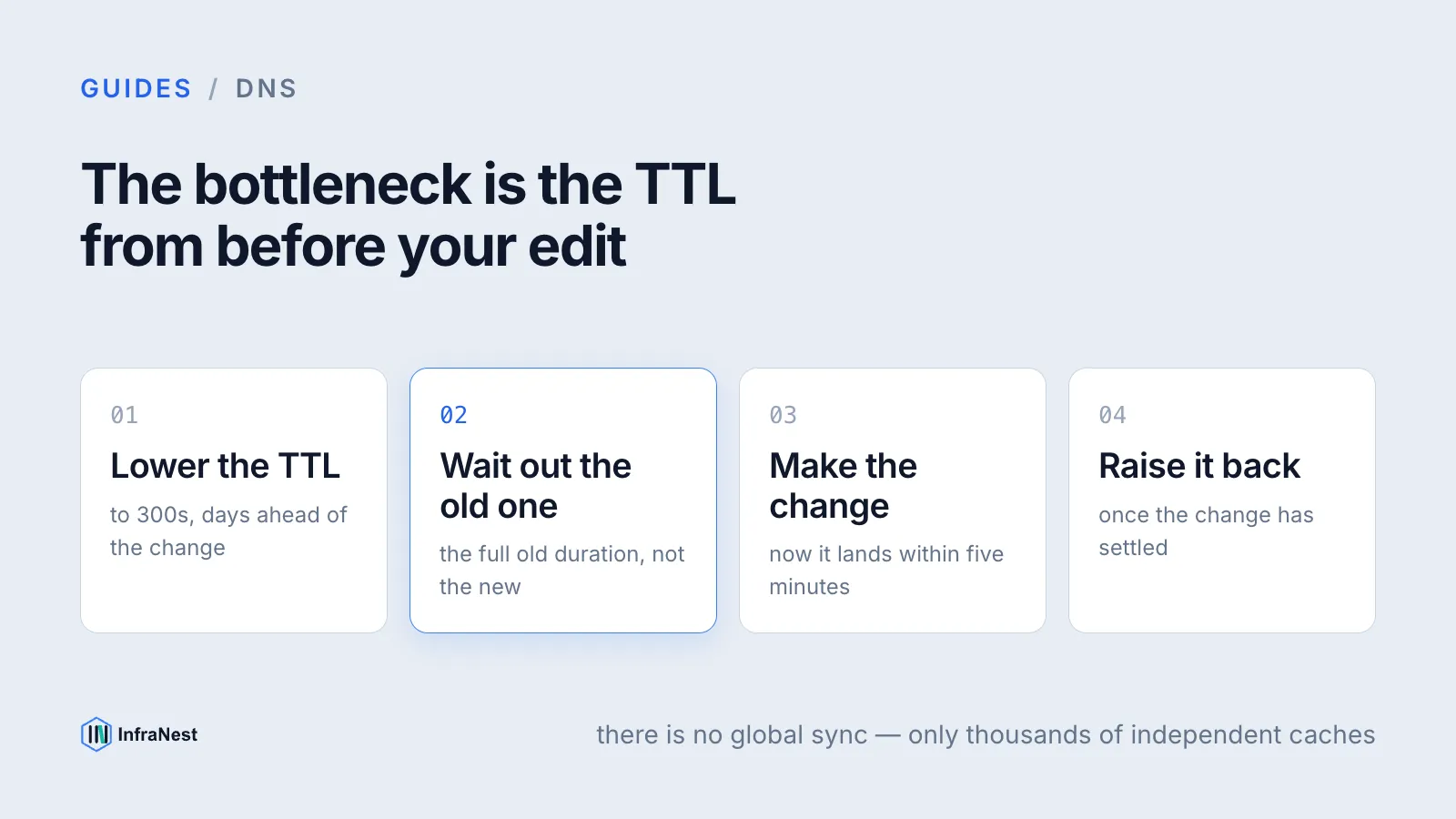
This means the correct sequence for any DNS change you care about timing is:
- Lower the TTL on the record days ahead of the actual change (to something like 300 seconds).
- Wait until the old TTL has fully expired everywhere — give it the full old duration, not the new one.
- Make the actual change (new IP, new CNAME target, whatever it is).
- Once the change has propagated and settled, raise the TTL back up if you want the caching benefit again.
TipSkipping step 1 is the single most common reason a DNS "cutover" seems to take forever — the record you just edited was never the bottleneck; the TTL from before your edit was.
Why nameserver changes are slower than record changes
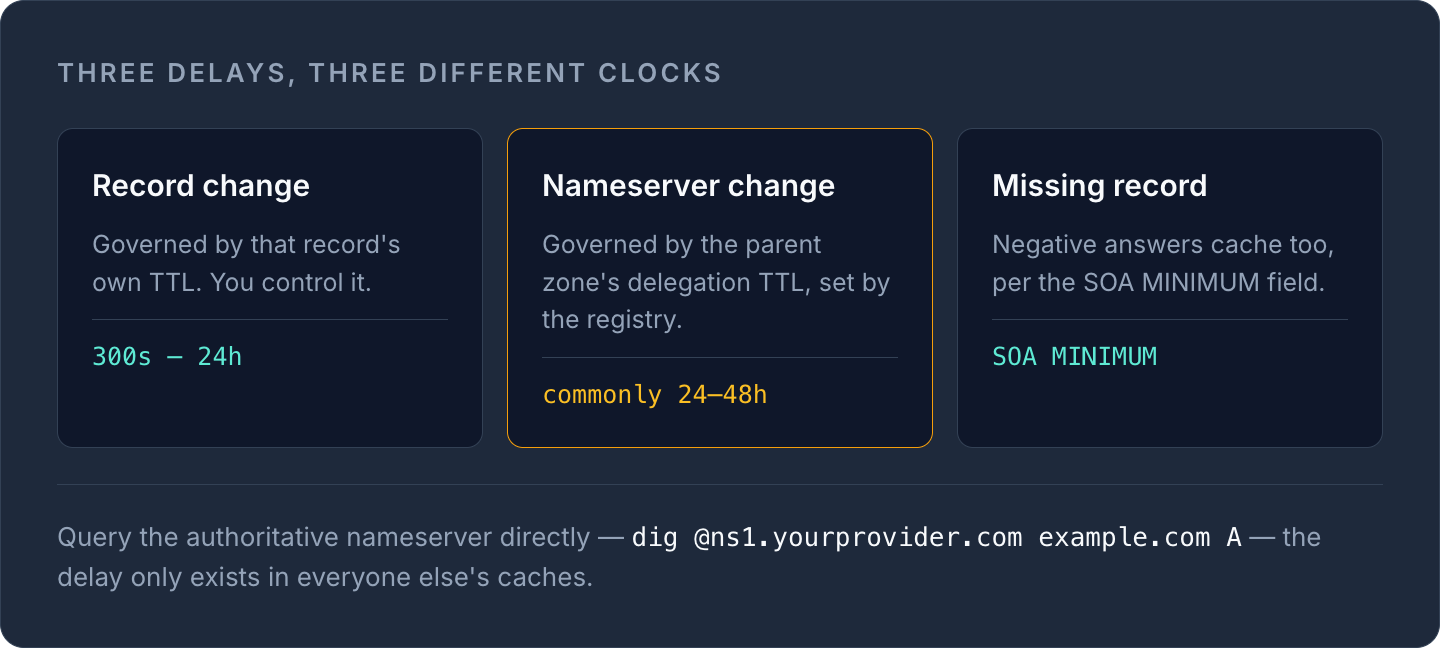
Changing an individual A, CNAME or MX record inside your existing DNS zone is a record-level change — it's governed purely by that record's TTL. Delegating a domain to entirely new nameservers is different: it's a change at the parent zone (the registry), and that delegation record has its own TTL, set by the registry rather than by you.
Because registry-level refresh intervals and parent-zone caching stack on top of your own zone's TTLs, nameserver (NS) delegation changes are commonly cited by providers as taking up to 24–48 hours, though the exact figure varies by TLD (top-level domain) and registry. Plan nameserver migrations with that longer window in mind, and avoid making other urgent DNS edits during the same window.
Negative caching: why a missing record also takes time to "fix"
If a resolver asks for a record that doesn't exist yet — say, you haven't created a subdomain's A record — the resolver caches that negative answer too. This is called negative caching, and it's governed by RFC 2308, which ties the negative TTL to the MINIMUM field of your zone's SOA (Start of Authority) record.
Practically: if you query a subdomain before it exists, get an NXDOMAIN response, then create the record five minutes later, some resolvers may keep answering with the old "doesn't exist" response until that negative cache entry expires. It's the same underlying mechanism as regular TTL caching, just applied to absence instead of presence.
How to check DNS propagation properly
The most reliable check is to query the authoritative nameservers directly, since they always have the current answer — the delay only exists in everyone else's caches, not in the source of truth.
dig +trace example.com A
dig @ns1.yourprovider.com example.com A
Or use our DNS lookup tool to pull the current record straight from the DNS, check the TTL that's actually set, and confirm the value matches what you just changed. If it doesn't match yet, that's expected — it just means the resolver you're checking against hasn't re-queried since your change, not that anything is broken.
A few practical checks worth running after any DNS change:
- Query from more than one resolver (your ISP's, plus a public one like Google or Cloudflare) — they cache independently, so you'll see different states mid-propagation.
- Check the TTL alongside the value, not just the value — a stale-looking answer with a low remaining TTL will self-correct shortly.
- If you're managing MX or SPF records, verify with MX lookup or the SPF generator rather than assuming email providers have picked up the change — see our guide on creating a secure SPF record for the full record syntax.
WarningDon't panic-edit a record repeatedly while waiting for it to propagate. Each edit resets what resolvers see once they do re-query, and if you're mid-way through a TTL window, extra changes just add more inconsistency across caches, not less.
Managing TTLs and propagation across multiple providers
If your domains, DNS and certificates are spread across several registrars and clouds, propagation delays get harder to reason about — you're tracking different TTL defaults, different registrar behaviour for NS changes, and different tooling for each provider. Centralising DNS management makes the TTL sequence above (lower, wait, change, raise) much easier to execute consistently, since you're setting and verifying TTLs from one place instead of juggling several dashboards. Our DNS management feature gives you that single view across providers, alongside record-level change history so you can see exactly what was set and when.
If you're still getting familiar with which record types are affected by TTL and how they interact, our complete DNS record types guide is a good companion to this one, and if you want the deeper mechanics of how a resolver finds an answer in the first place, see how DNS resolution works.
Next time you're planning a change, check the current TTL first — look it up here — and time your rollout around it instead of guessing.
Frequently asked questions
#How long does DNS propagation actually take?
It depends entirely on the TTL set on the record before you changed it — a record with a 5-minute TTL will generally settle within minutes, while one with a 24-hour TTL can take up to a full day for all resolvers to re-query. Nameserver delegation changes at the registry level are typically slower, often cited as up to 24-48 hours.
#Can I speed up DNS propagation?
You can't force other resolvers to drop their cache early, but you can lower the record's TTL well before making the change so the old, longer TTL has already expired by the time you edit it. This is the standard technique for minimising visible delay during a planned cutover.
#Why does my browser show the old site after I changed DNS?
Your browser or its resolver is still serving a cached answer from before your change, and that cache won't expire until the previous TTL runs out. Querying the authoritative nameserver directly, or using a DNS lookup tool, will show you the current record even while some caches are still stale.
#Does clearing my local DNS cache fix propagation delays?
It only fixes delays caused by your own machine's or router's cache — it has no effect on your ISP's resolver, public resolvers like Google or Cloudflare, or any other resolver elsewhere that cached the record independently. Full propagation still depends on each of those caches expiring on its own TTL schedule.
Was dit artikel nuttig?