DNSSEC (Domain Name System Security Extensions) voegt cryptografische handtekeningen toe aan DNS-records, zodat een resolver kan controleren of een antwoord echt van de eigenaar van de zone komt en onderweg niet is gemanipuleerd. Het versleutelt DNS-verkeer niet: je queries blijven gewoon leesbaar, tenzij je daarnaast DNS-over-TLS of DNS-over-HTTPS gebruikt. Waar DNSSEC tegen beschermt, is vervalsing: een aanvaller die een nep-A- of MX-record in het resolutiepad injecteert, waardoor je gebruikers op de verkeerde server terechtkomen.
Voor de meeste domeinen is het de moeite waard om het in te schakelen, maar het is geen vinkje dat je aanzet zonder te begrijpen wat er stukgaat als je het verkeerd doet.
Welke dreiging lost DNSSEC eigenlijk op?
Zonder DNSSEC kan een resolver op geen enkele manier vaststellen of een DNS-antwoord echt is. Dat gat wordt op twee bekende manieren misbruikt:
- Cache poisoning / spoofing: een aanvaller probeert een vervalst antwoord bij een resolver te krijgen voordat het echte gezaghebbende antwoord binnenkomt, en plant zo een nep-record (dit is het type aanval dat bekend werd door de Kaminsky-bug uit 2008).
- Manipulatie onderweg: iedereen die zich tussen de resolver en de gezaghebbende server bevindt (een gecompromitteerde router, een malafide provider, een man-in-the-middle) kan een ongetekend DNS-antwoord onopgemerkt herschrijven.
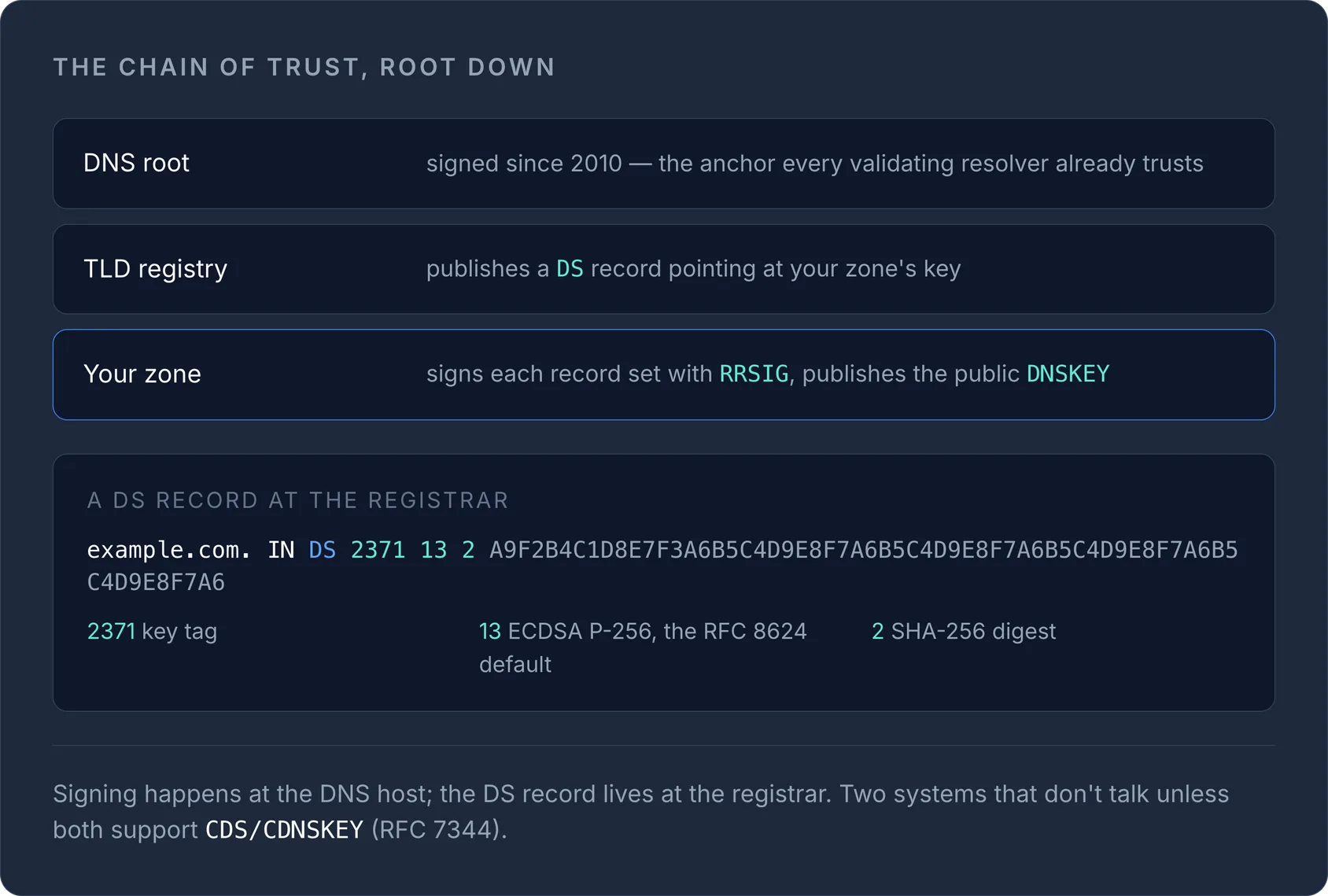
DNSSEC dicht beide gaten doordat de eigenaar van de zone records ondertekent met een privésleutel. Resolvers die validatie ondersteunen, controleren de handtekening (RRSIG) aan de hand van een gepubliceerde publieke sleutel (DNSKEY) en weigeren het antwoord als die niet overeenkomt. Die keten van handtekeningen loopt helemaal omhoog: jouw zone → je registrar/TLD-registry → de DNS-root, die sinds 2010 is ondertekend. Elk niveau publiceert een DS-record dat naar de sleutel van de onderliggende zone verwijst, zodat een validerende resolver de hele vertrouwensketen van de root tot aan jouw domein kan doorlopen.
NoteDNSSEC garandeert authenticiteit en integriteit, geen beschikbaarheid of privacy. Een ondertekende zone kan nog steeds uitvallen, en je queries zijn nog steeds zichtbaar voor iedereen die het verkeer meekijkt.
Waartegen DNSSEC niet beschermt
Het loont om hier precies te zijn, want de naam nodigt uit tot overschatting:
- Het houdt geen DDoS-aanvallen op je DNS-servers tegen. Sterker nog, DNSSEC-antwoorden zijn groter (RRSIG- en DNSKEY-records voegen omvang toe), waardoor ondertekende zones historisch gezien een groter doelwit waren voor DNS-amplificatieaanvallen als de provider geen rate limiting toepast.
- Het verbergt niet welke domeinen je opzoekt. Dat is een taak voor DoH/DoT, niet voor DNSSEC.
- Het beschermt de inhoud van e-mail niet en authenticeert geen afzenders. Daarvoor zijn SPF, DKIM en DMARC. Heb je die nog niet ingesteld, begin dan met een veilig SPF-record aanmaken.
De echte afweging: operationeel risico
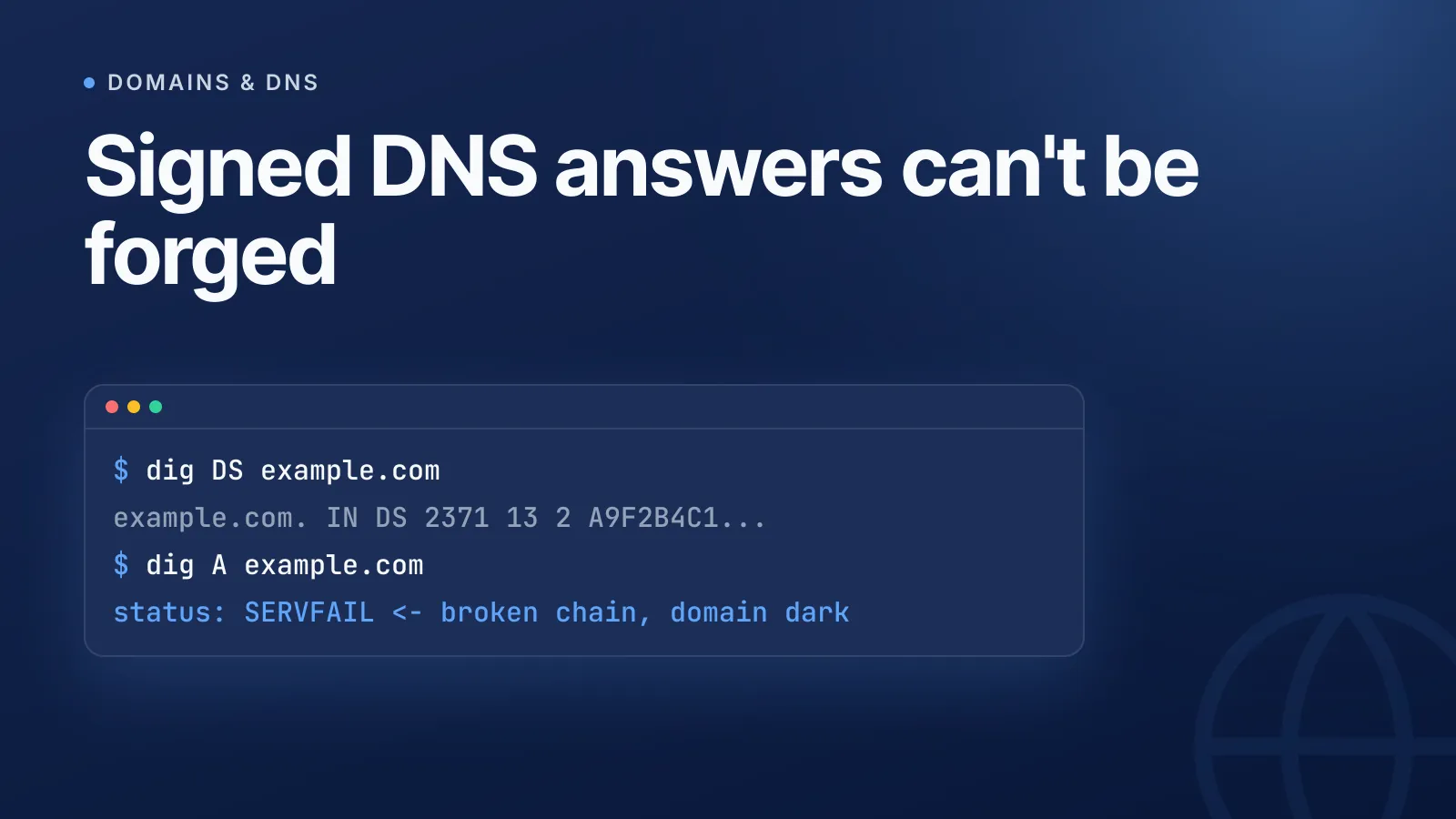
Het eerlijke nadeel van DNSSEC is niet de prestatie, maar dat een validerende resolver een kapotte handtekening behandelt als harde fout, niet als iets waarop hij terugvalt. Als je handtekeningen verlopen, of als het DS-record bij je registrar niet meer overeenkomt met de huidige sleutel van je zone (gebruikelijk na een key rollover of een migratie naar een andere DNS-provider), geven validerende resolvers SERVFAIL terug en verdwijnt je domein in feite voor iedereen die een validerende resolver gebruikt, ook al is de zone zelf in orde.
WarningVerkeerd geconfigureerde DNSSEC is een van de meest voorkomende oorzaken dat een domein onbereikbaar wordt na een overstap naar een andere DNS-provider. Migreer je nameservers, verwijder of werk dan het DS-record bij je registrar bij voordat de signing keys van de oude provider worden uitgeschakeld.
Daarom is DNSSEC op vrijwel elk groot platform opt-in. Cloudflare, AWS Route 53, Google Cloud DNS en de meeste registrars laten het standaard uit staan en vereisen dat je zelf het DS-record genereert en in de DS-beheerpagina van de registrar plakt. Er is geen veilige manier om die overdracht te automatiseren, want het ondertekenen gebeurt bij de DNS-host en het DS-record moet bij de registrar worden gepubliceerd: twee verschillende systemen die niet automatisch met elkaar communiceren, tenzij beide de CDS/CDNSKEY-automatisering uit RFC 7344 ondersteunen.
Moet je DNSSEC inschakelen?
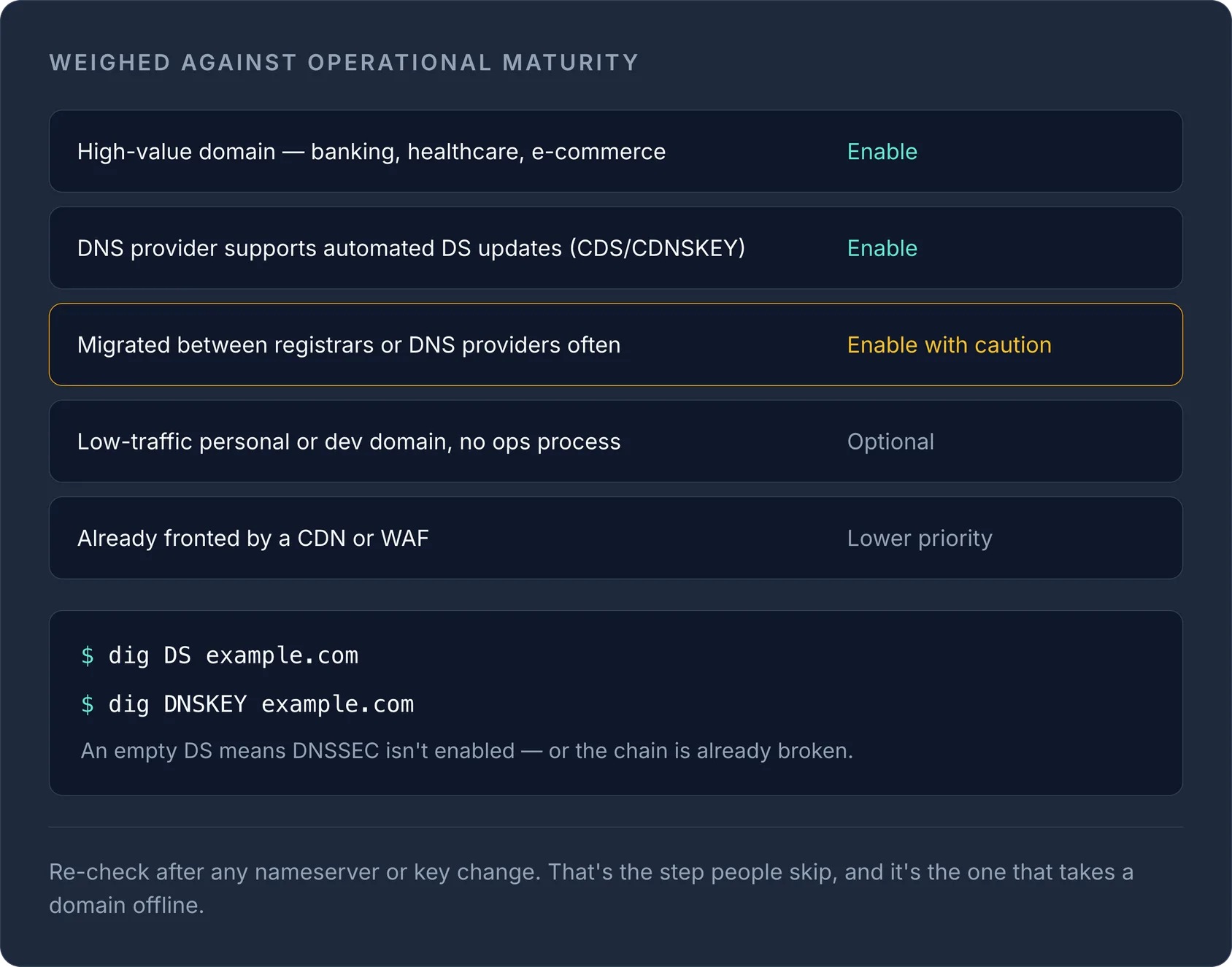
Over het algemeen wel, als je je kunt vastleggen op het monitoren van de vertrouwensketen. Weeg het wel af tegen hoe volwassen je operationele processen zijn.
| Scenario | Advies |
|---|---|
| Domein met hoge waarde (bankieren, zorg, e-commerce) | Inschakelen: het spoofingrisico weegt zwaarder dan de operationele overhead |
| Domein bij een DNS-provider die geautomatiseerde DS-updates ondersteunt (CDS/CDNSKEY) | Inschakelen: het rollover-risico wordt grotendeels voor je afgehandeld |
| Domein dat je vaak tussen registrars/DNS-providers verhuist | Voorzichtig inschakelen: werk tijdens een migratie altijd het DS-record bij, of schakel het eerst uit |
| Persoonlijk/dev-domein met weinig verkeer en zonder vast ops-proces | Optioneel: het voordeel is reëel maar klein, en een vergeten verlopen handtekening kan het hele domein offline halen |
| Domein dat al achter een CDN/WAF zit die de meeste verkeerspaden afhandelt | Lagere prioriteit: een aanvaller heeft minder makkelijke kansen om te spoofen, maar op lange termijn nog steeds de moeite waard |
DNSSEC controleren: heeft een domein het al?
Je kunt de DNSSEC-status van een domein controleren zonder een configuratiebestand aan te raken. Vraag de DS- en DNSKEY-records direct op:
dig DS example.com
dig DNSKEY example.com
Een ondertekende, correct gedelegeerde zone geeft een DS-record terug bij de registry en een bijpassende DNSKEY bij de gezaghebbende server. Komt DS leeg terug, dan is DNSSEC niet ingeschakeld (of is de keten verbroken). Onze gratis DNS lookup-tool doet dit zonder terminal: handig voor een snelle controle voordat je een klant vertelt dat zijn domein beschermd is.
Een typisch DS-record bij de registrar ziet er zo uit:
example.com. IN DS 2371 13 2 A9F2B4C1D8E7F3A6B5C4D9E8F7A6B5C4D9E8F7A6B5C4D9E8F7A6B5C4D9E8F7A6
De velden zijn de key tag, het algoritme (13 = ECDSA P-256, de huidige aanbevolen standaard volgens RFC 8624), het digesttype (2 = SHA-256) en de digest zelf.
DNSSEC inschakelen zonder dat er iets misgaat
- Schakel DNSSEC-signing in bij je DNS-provider. Hiermee worden een DNSKEY en een bijbehorend DS-record gegenereerd.
- Kopieer het DS-record naar de registrar van je domein (een andere stap dan stap 1, tenzij registrar en DNS-provider hetzelfde bedrijf zijn).
- Wacht tot de registry het heeft gepubliceerd en de TTL's zijn verlopen voordat je ervan uitgaat dat het volledig actief is.
- Controleer opnieuw met
dig DSof de lookup-tool hierboven na elke wijziging van nameservers of sleutels. Dit is de stap die mensen overslaan.
Beheer je de DNS- en registrarinstellingen voor hetzelfde domein op één plek, dan is deze overdracht veel minder foutgevoelig. Bekijk hoe ons DNS-beheer de signingstatus en records op registrarniveau op elkaar afgestemd houdt, in plaats van verspreid over twee dashboards.
Voor achtergrondinformatie over hoe een validerende resolver de keten van de root tot jouw zone doorloopt, zie hoe DNS-resolutie werkt. En als je nog niet helemaal thuis bent in recordtypes in het algemeen, behandelt de complete gids voor DNS-records wat elk type doet voordat je er DNSSEC bovenop zet.
Beheer je DNSSEC voor meerdere domeinen en providers, dan maakt het zichtbaar houden van DS-records en signingstatus in één DNS-dashboard het verschil tussen een rollover-mismatch binnen enkele minuten opmerken en het pas ontdekken wanneer een klant meldt dat je site plat ligt.
Veelgestelde vragen
#Maakt DNSSEC DNS-resolutie trager?
Het voegt een kleine hoeveelheid overhead toe, omdat ondertekende antwoorden groter zijn en validerende resolvers extra cryptografische controles uitvoeren, maar voor vrijwel alle domeinen is dit verwaarloosbaar vergeleken met normale DNS-lookuptijden.
#Kan ik DNSSEC en DNS-over-HTTPS samen gebruiken?
Ja, en ze lossen verschillende problemen op: DNSSEC controleert of het antwoord authentiek is, terwijl DoH/DoT de query onderweg versleutelt zodat die niet kan worden meegelezen. Met beide samen krijg je zowel authenticiteit als vertrouwelijkheid.
#Wat gebeurt er als ik vergeet het DS-record bij te werken na een overstap naar een andere DNS-provider?
Validerende resolvers zien een DS-record dat niet meer overeenkomt met de huidige signing key van je zone en geven SERVFAIL terug. Daardoor is je domein in feite offline voor iedereen die een validerende resolver gebruikt, totdat de mismatch is opgelost.
#Heb ik DNSSEC nodig als mijn site al achter HTTPS en een CDN zit?
HTTPS en DNSSEC beschermen verschillende lagen: HTTPS beveiligt de verbinding met je webserver, DNSSEC beveiligt de DNS-lookup waarmee die server überhaupt wordt gevonden. Ze vullen elkaar aan en zijn geen vervanging voor elkaar.
Probeer het met een gratis tool
Was dit artikel nuttig?