An SPF (Sender Policy Framework) record that returns "too many DNS lookups" has exceeded the 10-lookup ceiling set by RFC 7208, and receiving mail servers will treat the whole record as broken — not just the part over the limit. The fix is to flatten or consolidate your include: mechanisms so the total lookup count drops back under 10, without silently dropping a sending source.
Why the SPF 10-lookup limit exists
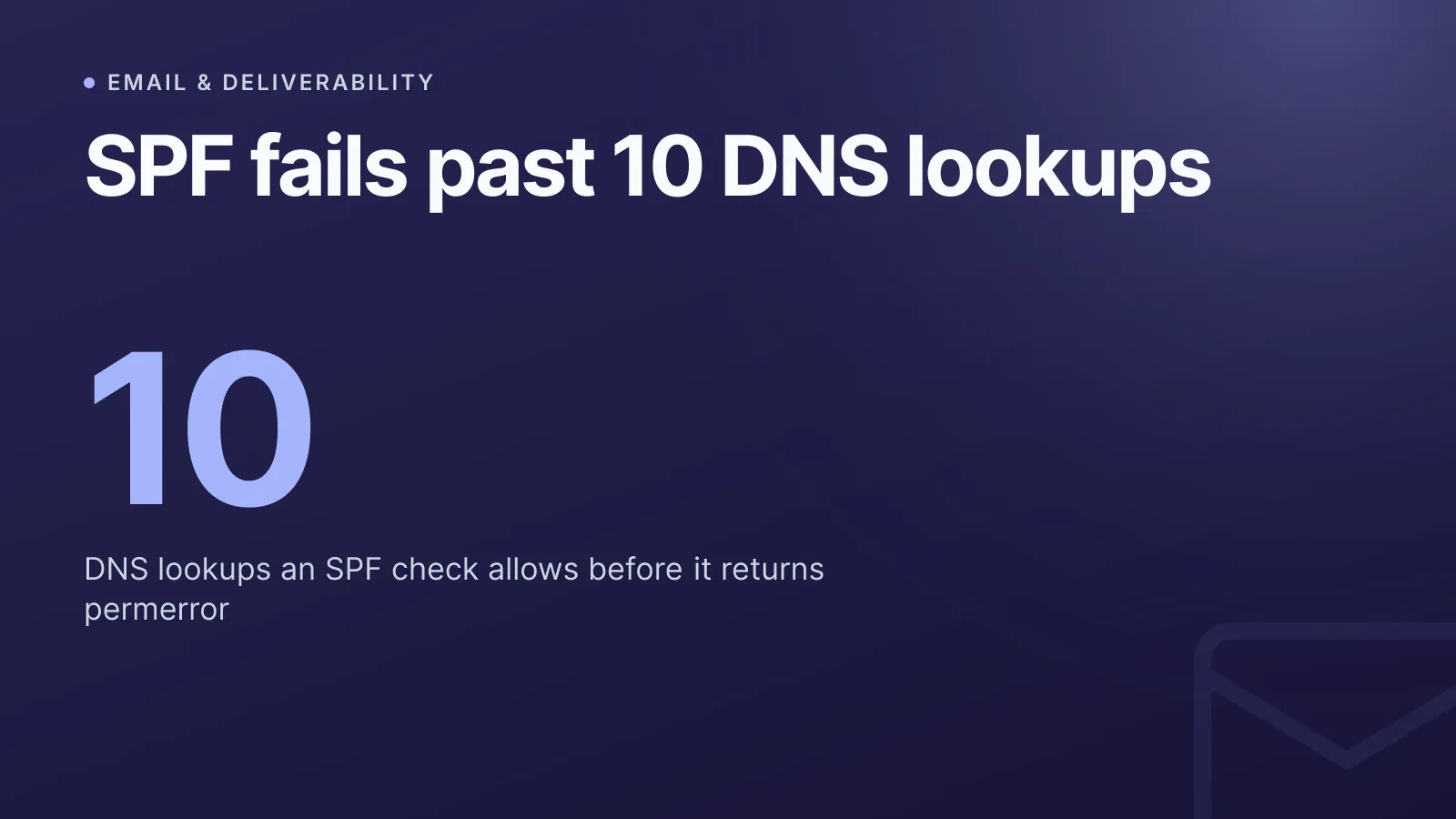
RFC 7208 §4.6.4 caps SPF evaluation at 10 DNS lookups per check, and any record that needs more must return a permerror. This isn't a soft warning — a permerror means the receiving system can't reliably determine your policy, so it falls back to local rules, which often means the message gets junked or rejected outright.
The mechanisms and modifiers that count toward the 10-lookup budget are:
includeamxptrexistsredirect
Mechanisms that don't count because they resolve without a DNS query:
ip4ip6all
That distinction is the whole basis for "flattening" — swap lookup-based mechanisms for the IP ranges they'd eventually resolve to, and the lookup count drops without changing what's actually authorised.
Why records go over the limit so easily
Most domains don't get here by adding ten sending services on purpose. A handful of common integrations does it:
- Google Workspace or Microsoft 365 for primary mail
- A helpdesk tool (Zendesk, Freshdesk) for support replies
- A marketing platform (Mailchimp, HubSpot) for campaigns
- A transactional sender (SendGrid, Mailgun, Postmark) for app emails
- A CRM or e-signature tool that also sends on your behalf
Each of those is typically added as one include:, but many large providers nest their own includes several layers deep. Adding three or four popular services can easily add 8-10 lookups on its own, especially once nested include chains and any mx or a mechanisms are counted.
WarningA record can look fine in a text editor and still fail in production, because the 10-lookup count includes every nested
includeresolved recursively — not just the ones visible in your own TXT record.
There's also a separate void lookup limit of 2: a void lookup is any query that returns NXDOMAIN or no answer. Stale or mistyped include: targets from a service you no longer use can trip this limit even if your visible lookup count looks under 10.
How to check your current lookup count
Start by pulling the raw record and walking each include: by hand, or run it through our free SPF generator, which validates a record and flags mechanisms that push it over the limit. You can also inspect the underlying DNS with our DNS lookup tool to see exactly what each include: resolves to before you decide what to flatten.
A record heading for trouble often looks like this:
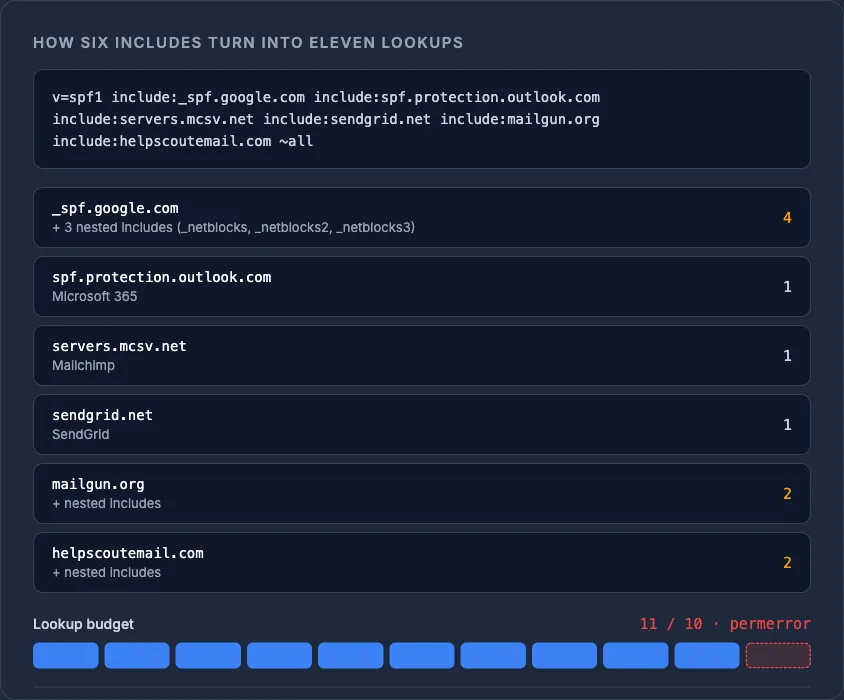
v=spf1 include:_spf.google.com include:spf.protection.outlook.com include:servers.mcsv.net include:sendgrid.net include:mailgun.org include:helpscoutemail.com ~all
Six include: mechanisms, each potentially nesting more underneath — this is a realistic way to blow past 10 lookups with only a handful of services.
Flattening: swap includes for IP ranges
Flattening means resolving each include: down to the ip4/ip6 ranges it currently points to, then hard-coding those into your record with ip4:/ip6: mechanisms instead of include:. Since IP mechanisms are free (they don't count toward the limit), a record with a dozen IP ranges can still pass easily under 10 lookups.
v=spf1 ip4:198.51.100.0/24 ip4:203.0.113.10 ip6:2001:db8::/32 include:_spf.google.com ~all
This flattens the low-priority senders to IPs and keeps only the highest-churn provider (Google, in this example) as a live include:, since providers rotate their sending ranges and a fully flattened record needs manual upkeep every time they change.
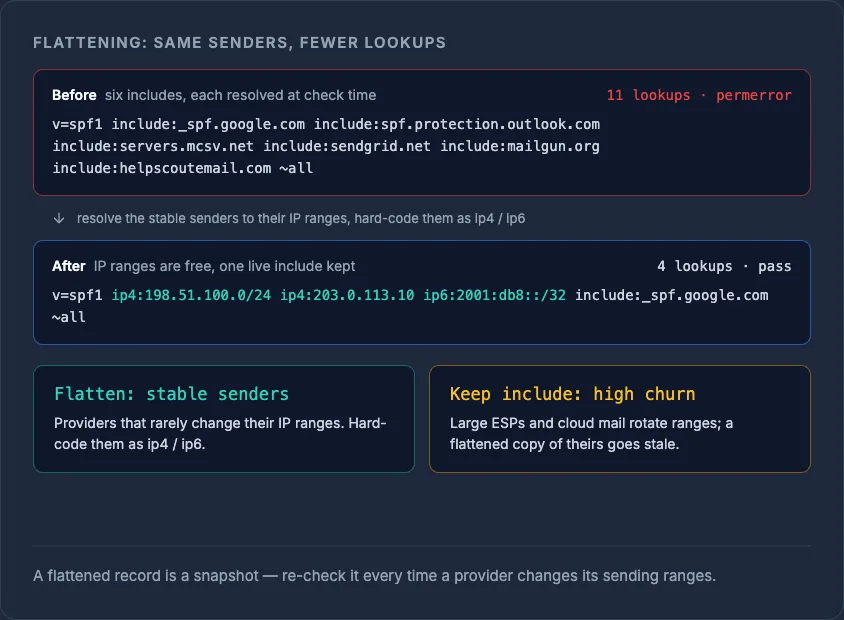
TipFlatten the providers that rarely change their IP ranges, and leave the ones that rotate frequently (large ESPs, cloud mail platforms) as
include:mechanisms — this balances lookup count against maintenance burden.
Consolidating instead of flattening
If flattening feels too brittle for your team to maintain, consolidate first:
- Remove
include:entries for services you no longer send through. - Merge duplicate mechanisms — two
include:statements pointing at the same underlying provider add up fast. - Check whether a service offers a single, narrower SPF include rather than the default one that pulls in unrelated infrastructure.
- Confirm you don't have more than one SPF TXT record on the domain — RFC 7208 §3.2 requires exactly one, and having two also causes a permerror, independent of the lookup count.
A redirect modifier can replace an entire record with another domain's policy, but RFC 7208 §6.1 says it should only appear when no other mechanisms are present in that record — mixing redirect with your own include:/all mechanisms produces unpredictable evaluation.
What happens if you ignore it
A permerror isn't neutral — most receivers apply local policy on top of it, and since DMARC alignment depends on SPF passing, a broken SPF record commonly breaks DMARC alignment too, even when DKIM still checks out. That combination is a frequent, quiet cause of mail landing in spam; if you're troubleshooting deliverability more broadly, see why your emails go to spam for the wider picture beyond SPF alone.
Quick reference: what counts toward the limit
| Mechanism/modifier | Counts toward 10-lookup limit? |
|---|---|
include |
Yes |
a |
Yes |
mx |
Yes (max first 10 MX records used) |
ptr |
Yes (deprecated, avoid) |
exists |
Yes |
redirect |
Yes |
ip4 / ip6 |
No |
all |
No |
Once your record is fixed, keep an eye on it — SPF drift creeps back in every time a team adds a new sending tool without checking the existing budget. If you're managing DNS across multiple registrars and providers, our DNS management tools give you one place to see and edit every record before it silently breaks mail delivery.
Frequently asked questions
#What exactly counts as one SPF DNS lookup?
Each include, a, mx, ptr, exists, and redirect mechanism counts as one lookup, and nested includes inside those also count toward the same total. ip4, ip6, and all don't require a DNS query, so they're free.
#Does exceeding the SPF lookup limit block all my mail?
It causes a permerror, which most receiving mail systems treat as a failed or unusable SPF check rather than a neutral result — this often leads to messages being rejected or sent to spam, and it can also break DMARC alignment on SPF.
#Can I just have two SPF records to fit more senders in?
No — RFC 7208 requires exactly one SPF TXT record per domain, and having more than one also produces a permerror, separate from the lookup-count issue.
#How often do flattened IP ranges need updating?
It depends on the provider; some rarely change sending ranges while others rotate them regularly, so flattened records need periodic re-checking against the provider's current published ranges to avoid losing legitimate senders.
Try it with a free tool
Was this article helpful?