

If you'd rather use your keyboard than your mouse, InfraNest has shortcuts for moving around and getting things done quickly. This is for anyone who wants to work faster.
Overview
- InfraNest supports keyboard shortcuts for navigating pages, searching, and working with lists and tables.
- A built-in cheatsheet shows you every shortcut, grouped by what it does.
- Shortcuts won't fire while you're typing in a field, so you can type normally without accidentally triggering one.
See every shortcut
- From anywhere in InfraNest (as long as you're not typing in a field), press ?.
- The shortcuts cheatsheet opens, listing every shortcut grouped by what it does.
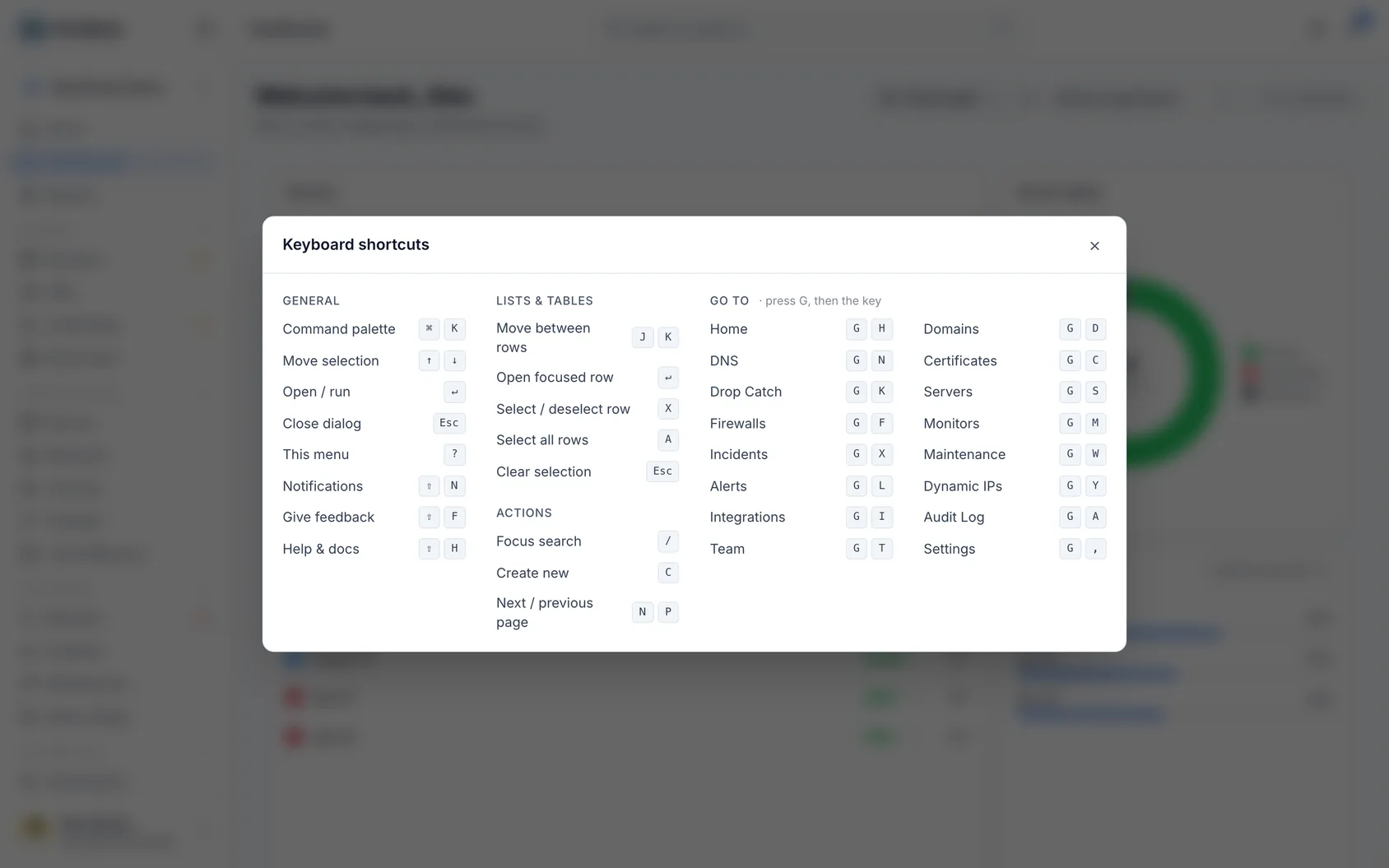
The ones you'll use most
- ⌘K / Ctrl+K — open the command menu to jump to any page or search help.
- ? — open the shortcuts cheatsheet.
- ⇧N — open your notifications.
- ⇧H — open the help panel (press / inside it to search).
- ⇧F — send feedback.
- Esc — close whatever's open.
Use shortcuts in lists and tables
- Press J or K to move down and up the rows.
- Press ↵ to open the highlighted row.
- Press X to select it, or A to select all. Press Esc to clear the selection.
- Press / to jump to the search box.
- Press C to create a new item.
- Press N or P to go to the next or previous page.
Jump to a section
- Press G, then a letter for the section you want — for example, G then D for Domains, G then S for Servers, or G then H for the dashboard.
- Check the cheatsheet (press ?) if you're not sure which letter to use — it lists every "go to" letter.
TipPress ⌘K or Ctrl+K from any page to quickly jump to another page or search help without touching the mouse.
Was this article helpful?
Related articles
Search and jump aroundInfraNest has a quick command menu so you can jump to any page or find help without clicking through the menus.Getting helpHelp is built into InfraNest — you can read guidance for whatever page you're on without leaving it.Getting started with InfraNestWelcome to InfraNest. When you sign up, a short setup wizard gets your workspace ready, and Home then guides you through the first few things to do.Home — what needs you right nowHome is the page you land on when you sign in. It tells you, in one sentence, whether anything needs you — and if something does, which thing to do first.