

A guide to setting up InfraNest so it catches an expiring domain for you the moment it becomes available, without you having to watch the clock.
Overview
- When you watch a domain, you choose how InfraNest should try to get it the moment it drops.
- You can simply be alerted, have InfraNest register it through your own connected registrar, or use a backorder service for contested names.
- InfraNest tracks the registry's timeline for you and tells you what to expect and when, so you always know where a watch stands.
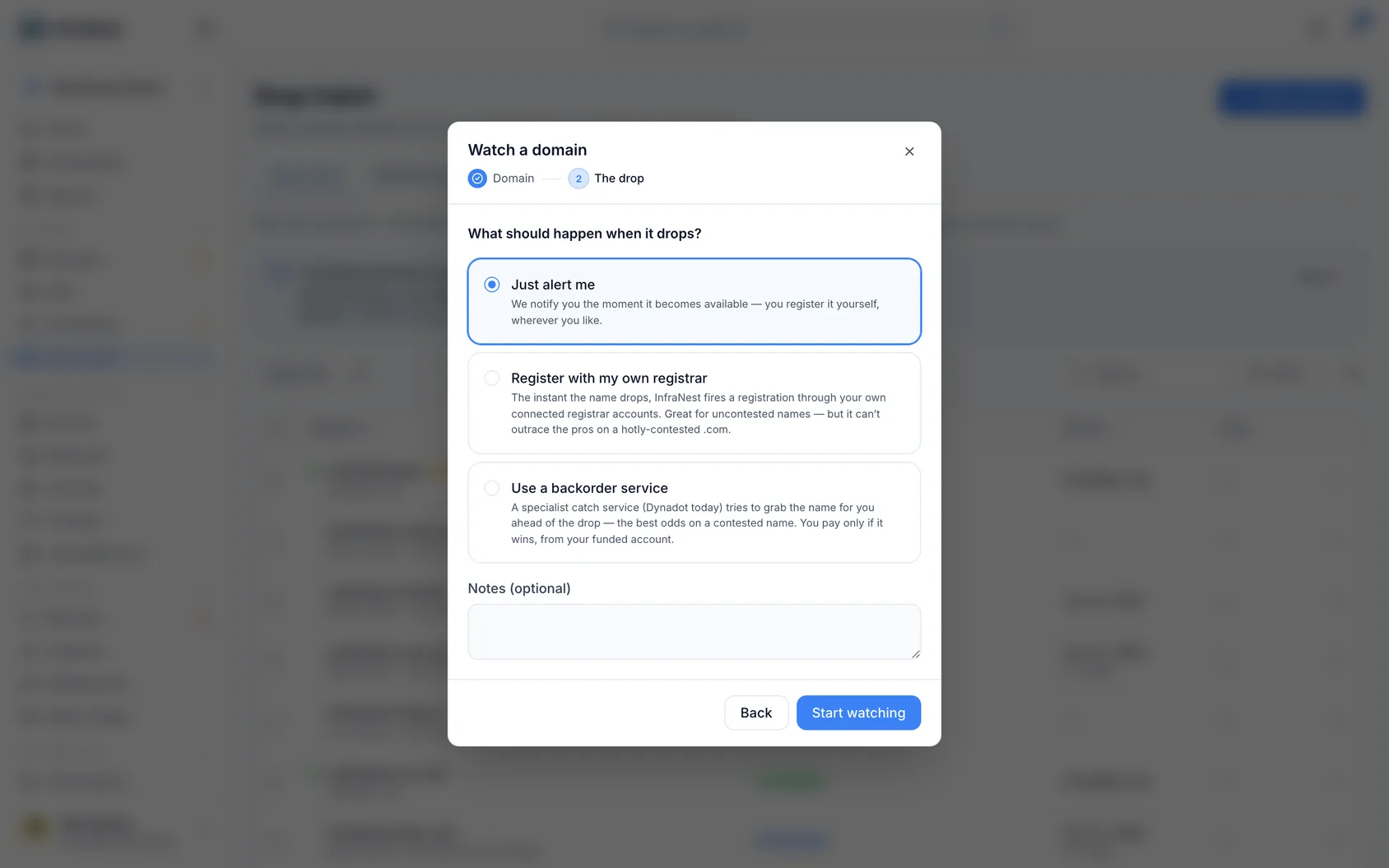
Choose how to catch it
- On the add-watch screen, pick one of three options: Just alert me, Register with my own registrar, or Use a backorder service.
- You can change this later from the watch itself using Change strategy.
- Just alert me — you're notified the instant the name is available and you register it yourself.
- Register with my own registrar — InfraNest auto-registers it through your connected registrar accounts.
- Use a backorder service — a specialist service (Dynadot) tries to catch the name ahead of the drop. Best for contested names; you only pay if it wins.
Register with your own registrar
Open the watch, click Change strategy and choose Register it for me.
Choose your registrars in order — a target and one or more backups. If the first can't register it, InfraNest falls through to the next. Each registrar shows its standard price for the ending, first year and renewal, where it publishes one.
Your registrars appear straight away, and price and availability fill in behind them as they arrive, so you can start ordering before everything has loaded. A registrar showing Checking… hasn't answered yet. One showing Not checked couldn't be reached — that's about the connection, not the registrar, and you can still choose it. A registrar that genuinely doesn't offer the ending moves to its own Not available list.
Pick the registrant contact to use, and fill in any extra details the domain ending requires. Some endings have rules about who may hold them —
.euneeds an EU/EEA registrant,.deneeds an administrative contact with a German address — and InfraNest flags these for you.Check the catch-readiness panel — it's green when everything's in place, or shows a checklist of what's still missing.
When the domain drops, InfraNest confirms it's available, registers it, adds it to your domain portfolio, and logs every attempt.
Understand the watch page
The At the drop panel always shows what will happen when the name is released: the mode you chose, the registrars in the order they'll be tried, and the contact the domain will be registered to. If it says We can only notify you, the catch isn't set up yet.
Expected drop is an estimate with a margin, not a fixed appointment, because registries delete names in batches:
- in 12 days — the estimate is still ahead.
- Any time now — the moment has arrived; InfraNest is checking at the shortest interval and there's nothing for you to do.
- Later than expected — the whole estimated window has passed and the registry still hasn't deleted the name. The watch keeps running and eases off its checking rate as the estimate ages, tightening again the moment the registry status changes.
Next check says Due now when a check is queued and about to run.
Why the wait differs by ending
How long a name takes to become free after it expires is set by the organisation that runs the ending — anywhere from days to months. A .es is gone about 10 days after expiry. A .com takes around 80. A .uk takes 95. A .no takes closer to 150.
So a drop date that looks far away usually isn't a mistake, and one that looks close doesn't mean the owner only just let go — it's the ending's own timetable.
For most endings InfraNest holds the operator's published timings. Where it doesn't, the watch says so and you should treat the date as a rough guide. Either way, checking intensifies as the estimate approaches, so being a few days out doesn't cost you the name.
Where the dates come from
Only Registered and Expired are facts read straight from the registry. The rest used to be guesswork on top of the expiry date, since the registrar — not a fixed rule — decides when in the following 45 days or so to actually delete a domain.
When the registry reports the actual deletion date, InfraNest uses that instead and measures everything after it from there, noting this on the page. If the registry ends up holding a name longer than expected, the page says that too, rather than leaving a stale drop date.
Some endings go to auction instead
On a few endings, the registry letting go isn't the moment you can register the name:
- .ai — enters a 14-day auction open only to registrars, with price falling daily; the watch tells you when ordinary pricing resumes.
- .ca and .cz — allocated at a scheduled registry auction; unclaimed names return to general availability shortly afterwards.
The watch factors this into the odds and times its final checks for when registration can actually succeed.
.uk is exact
Nominet publishes the precise second each pending-delete .uk name is released, so the watch shows that exact time rather than an estimate — no margin needed.
The record panel shows the registry's current status for the name in plain words ("Pending delete", "No nameservers") rather than codes — hover a status to see the original code if you need it for a support ticket.
Place a backorder instead
- Choose Use a backorder service and pick your connected Dynadot account.
- InfraNest places the backorder ahead of the drop.
- Dynadot attempts the catch. If it wins, the domain is deposited into your funded Dynadot account, which InfraNest then imports for you automatically.
You only pay if the backorder wins.
NoteA backorder needs a connected Dynadot integration with funds in the account, and the Business plan.
Which plan you need
| Free | Pro | Business and up | |
|---|---|---|---|
| Watch a domain and get an alert when it drops | ✓ | ✓ | ✓ |
| Register it yourself the moment it drops | — | ✓ | ✓ |
| Try every registrar at once (parallel racing) | — | — | ✓ |
| Backorder through Dynadot | — | — | ✓ |
If your plan doesn't include the catch method a watch is set to, it alerts you instead and says so — Alert only on your plan. Nothing is registered or charged until you upgrade.
Alerts
You're notified at each key moment — dropping soon, available, went to auction, caught or failed — through your alert destinations (email, Slack, Telegram) and outbound webhooks.
- Dropping soon shows the stage it's in, when it's expected to drop, and how it will be caught.
- Caught tells you which registrar registered it, then suggests pointing it at your site and turning on the transfer lock.
- Renewed by its owner, sent to auction, not enough credit, and couldn't read the registry each explain what happened and what to do.
All emails about one watch share one subject, such as northwind.io — drop catch, so your inbox keeps them together.
Dropping soon now only fires when the estimated drop is genuinely within about a week.
If there isn't enough credit to pay for it
Registrars like Dynadot, Porkbun, Namecheap and Openprovider take payment from a prepaid account balance. If that balance is empty when the name drops, registration is simply refused — and a drop only happens once.
Once the drop is close, InfraNest checks the balance of every registrar you armed the watch with against the price of that ending, and warns you only if none of them can cover it. If the first is short but a backup is funded, the catch still works and there's nothing to do.
The watch page shows the same warning as a red panel with a link to top up. Top up before the expected drop and the catch goes ahead as normal.
NoteInfraNest stays quiet when it can't tell — a registrar that doesn't report a balance, bills a card instead of a prepaid balance, or has automatic top-ups switched on. No warning means "nothing known to be wrong," not "definitely fine."
The readiness check runs ahead of time so a catch never fails at the last second for a missing detail. It tells you three different things, and only the first stops a catch:
- Something is missing — an incomplete registrant contact, or a required field for the ending. Fix it before the drop.
- We couldn't check — your registrar didn't answer when asked what the ending requires. Nothing is known to be missing, but the registrar can still refuse.
- A backup needs more — a backup registrar asks for details the target doesn't. Reorder your registrars, or catch through the one you've already filled in.
Prices shown are each registrar's standard rate for the ending, not a quote for this domain — a dropped name can be priced as premium, and taxes aren't included.
Was this article helpful?