

Move a domain you already own from another registrar to one you've connected to InfraNest, with checks up front so you find out before you start whether the transfer will actually go through.
Overview
- A transfer is run by the registry, not by InfraNest, and it usually takes 5 to 7 days.
- When a transfer fails, it tends to fail quietly: the request is accepted, nothing happens, and you find out a week later.
- So when you open the transfer form, InfraNest checks the things that most often go wrong and tells you what to do about each one.
Before you start
When you start a transfer, InfraNest runs a set of checks and shows the results right on the form:
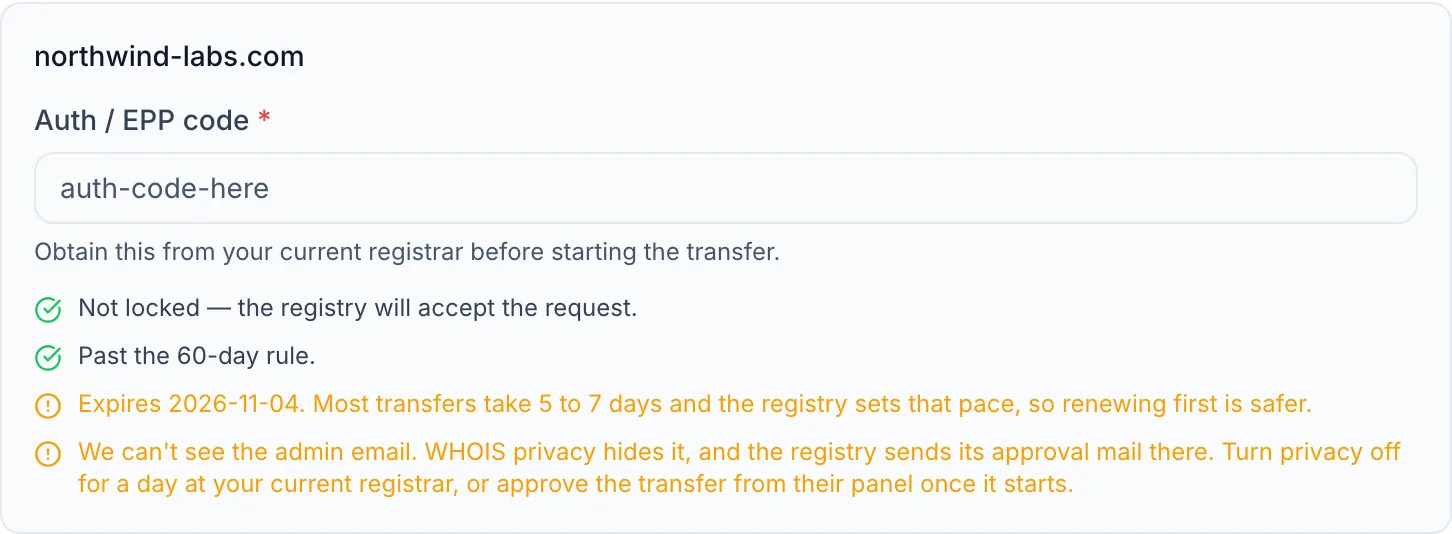
- Will the new registrar take it? Some registrars can be asked outright whether they'll accept a particular domain, and where that's possible InfraNest asks at this point rather than guessing. If the answer is no, pick one of your other registrars instead; nothing else matters until this is settled.
- Is it locked? Most registrars switch on a transfer lock by default. If it's on, turn it off in your current registrar's control panel and start again.
- Is it too new? A domain can't be transferred within 60 days of being registered, or within 60 days of a previous transfer. If that applies, InfraNest shows the date it becomes free to move.
- Is expiry close? A transfer adds a year to whatever is left, so you don't lose time you've paid for. But if the domain expires within a couple of weeks, renewing first is safer than racing the registry.
- Can the approval email reach you? The registry emails the domain's administrative contact to approve the transfer. If WHOIS privacy is hiding that address, you may never see the message. Turn privacy off for a day at your current registrar, or approve the transfer from their control panel once it starts.
Some registries don't publish all of this. When InfraNest can't tell, it says so rather than giving you an all-clear it can't stand behind.
NoteNone of these checks blocks the transfer. They're advice — the registry has the final say, and you may have good reason to go ahead anyway.
Transfer a domain
- At your current registrar, unlock the domain and ask for its EPP / Auth Code (also called a transfer code).
- In InfraNest, go to Domains and select Add domain, then search for the domain. A name you already own shows as Taken with an Add transfer button on each registrar that can take it.
- Add it to the cart. Under What else is needed, paste the auth code for that domain.
- Read the checks shown underneath and deal with anything flagged — each one says what to do about it.
- Choose the contacts to use.
- Select Add domain. The transfer runs in the background. The domain shows Transferring until it arrives in your account at the new registrar — usually 5 to 7 days — and you get a notification when the transfer completes.
NoteIf the button is greyed out, the cart lists what's missing — usually the auth code, or no contact yet.
NoteYou can mix them: a search that turns up some free names and some you already own puts both in one cart, and each line does the right thing.
NoteSometimes the search says the accounts below can usually take over a domain like this, but none of them could confirm it for this one. Not every registrar offers a way to ask in advance, so for those InfraNest goes by whether the name is registered at all. You can still add the transfer — the answer comes back when it starts, and a refusal costs you nothing.
Good to know
- The domain keeps working during the transfer. Nothing about its nameservers or DNS changes until it completes.
- The transfer fee usually buys a year, added to the time already remaining.
- Auth codes expire at some registrars. If yours is refused, request a fresh one. Where the registrar can check the transfer in advance, you'll be told before the transfer starts rather than after it has been sitting in progress.
- Not every connected registrar accepts transfers for every ending — only the ones that do are offered.
Troubleshooting
If a transfer is taking longer than a week, or has failed, see the separate article on a stuck domain transfer for next steps.
Was this article helpful?