

Verifying a domain proves your organization controls it, so colleagues on that domain can join you and your sign-in connections can trust it automatically.
Overview
- Verification is a one-off DNS record — nothing happens until it's in place, and an unverified domain grants no access at all.
- Once verified, people signing in with an address on that domain can ask to join your organization.
- Sign-in connections can accept "our verified domains" instead of a list you maintain by hand.
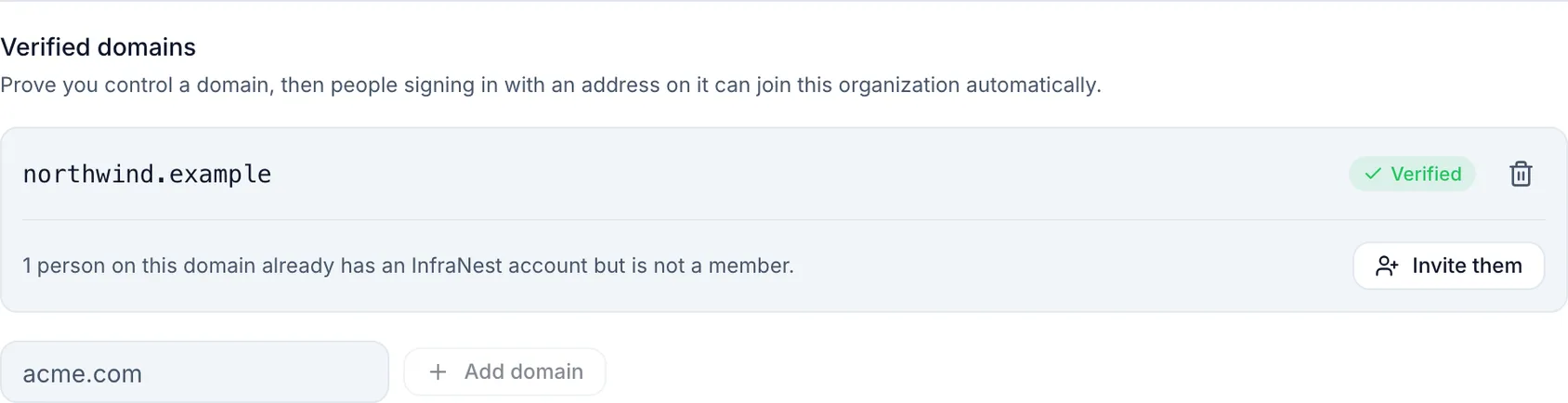
Verify a domain
Go to Settings → Sign-in → Verified domains.
Type the domain (for example
acme.com) and choose Add domain.You'll see the exact record to create:
Type TXT Host _infranest-challenge.acme.comValue a code unique to you Create that record at whoever runs your DNS, then choose Check now.
NoteDNS changes take a few minutes to spread, so "not found yet" on the first check is normal. We keep checking in the background for two weeks after you add the domain, so a record you add later still gets picked up. After that, choose Check now.
If your DNS is already here
When the domain sits in a DNS zone you manage in InfraNest, you don't have to touch anything: the panel says so and offers Add it for me. We create the record, and the panel updates to show it's in your zone. While you keep the page open it checks on its own, usually within a minute, and the domain changes to Verified automatically. If your DNS provider is slow and the panel stops checking, choose Check now.
If the zone is here but connected read-only, we'll say so too — add the record at your provider instead, or connect the provider so we can write to it.
Invite colleagues who already have an account
Once a domain is verified, InfraNest can tell you how many people on it already have an account but aren't members of your organization. Choose Invite them and each gets a normal invitation to accept.
WarningThis is never automatic. Verifying a domain does not pull existing accounts into your organization, and it never moves anyone out of an organization they're already in.
What a verified domain is used for
- Joining. Depending on your connection's setting, someone signing in with an address on the domain can request to join.
- Restricting sign-in. A connection can accept "our verified domains" instead of a list you maintain by hand.
Exact matches only: verifying acme.com does not cover mail.acme.com. Verify that separately if you need it.
Keeping it verified
We re-check verified domains periodically. If the TXT record disappears, we don't drop the domain immediately — a single failed lookup is usually a DNS hiccup, not a lost domain. It's only withdrawn after the record has been missing for a while, and that's recorded in your audit log.
Leave the record in place. Its description in your DNS says the same.
Removing a domain
Remove it from the list at any time. If we created the TXT record for you, we clean it up too. Anything you added by hand stays — we don't delete records we didn't create.
Troubleshooting
"That domain is already claimed." A domain can belong to only one organization, so nobody can claim yours. If you believe it's yours, contact support.
It never verifies. Check the host is the full _infranest-challenge.<your domain> — some DNS providers add the domain automatically, which can produce a doubled name. Then confirm the value matches exactly.
Was this article helpful?